Installation
Installation has only been tested under windows 10 x64, but it should be possible to adapt it to Linux or MacOS.
Requirements: At least 2gb of free space
Anaconda
Anaconda is required for this software. If you haven’t already, visit the official website and download the latest *.exe installation file for Python 3.x.
Once the download completes, open and run the .exe installer.
Follow the instructions, and in the advanced options, tick the Path checkbox.
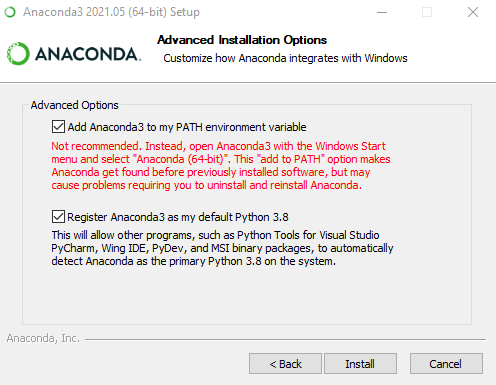
Tick both options here. If not possible, please add python to path manually
Once your installation is completed, reboot your computer.
Installation script
Warning: You need a fast and reliable internet connection during this operation
The installation of the python environment is automated using a .bat command file. Run it (double click it). A command line interface (CLI) will pop up during installation. If everything goes well, no error message will show up. Close the CLI when the installation is done.
What it does: This configures a python environment with the right Python libraries to run all the program (according to the environment.yml file). This chubacapp environment will be accessible for advanced users and debugging.